
A caller says their email address. The transcript shows "jay dot ellis at example dot com", or "j ellis at example.com", or "jayellis@exampel.com". One wrong character and the confirmation email never arrives, the quote goes to a stranger, or a duplicate record appears in the CRM. Street addresses fail in the same way: a missing flat number, a misheard street name, a postcode with two letters swapped.
These fields are hard by voice for a simple reason: they are free-form strings with no spoken checksum. A date or a yes/no answer can be checked against a short list of valid options. An email address or a street name usually cannot.
This guide is for the conversation designer or voice-agent builder who owns lead capture, booking or support flows. It gives one capture pattern per field, a bounded confirmation rule, an attempt limit, and a clear point at which to stop asking and switch channel or hand over to a person. It ends with a synthetic 20-item test set you can run against any prototype.
It does not cover reference numbers and account IDs, which are mostly digits and suit keypad entry, or how the agent pronounces numbers and dates back to the caller. Those are separate design problems.
Why these fields fail by voice
Three things go wrong, and each needs a different fix.
Recognition. Speech-to-text has to turn sounds into characters it has rarely seen together. Letters that sound alike (B, D, E, P, T, V; M and N; F and S) are easy to confuse on a narrowband phone line, for people and for software. Uncommon names, house names and street names are exactly the words a general model is least ready for.
Structure. Callers say emails in many ways: "dot", "period", "full stop", "underscore", "dash", "hyphen", "at", or the domain run together as one word. Addresses arrive in any order, with or without unit numbers, sometimes with the postcode first.
Confirmation. Reading back a long string as a whole invites a "yes" from a caller who stopped listening halfway. A confirmation the caller cannot actually check is not a confirmation.
The pattern below works on all three: it captures the structure first, validates what can be validated, and confirms in pieces short enough for a person to hold in their head.
Email: capture the structure first
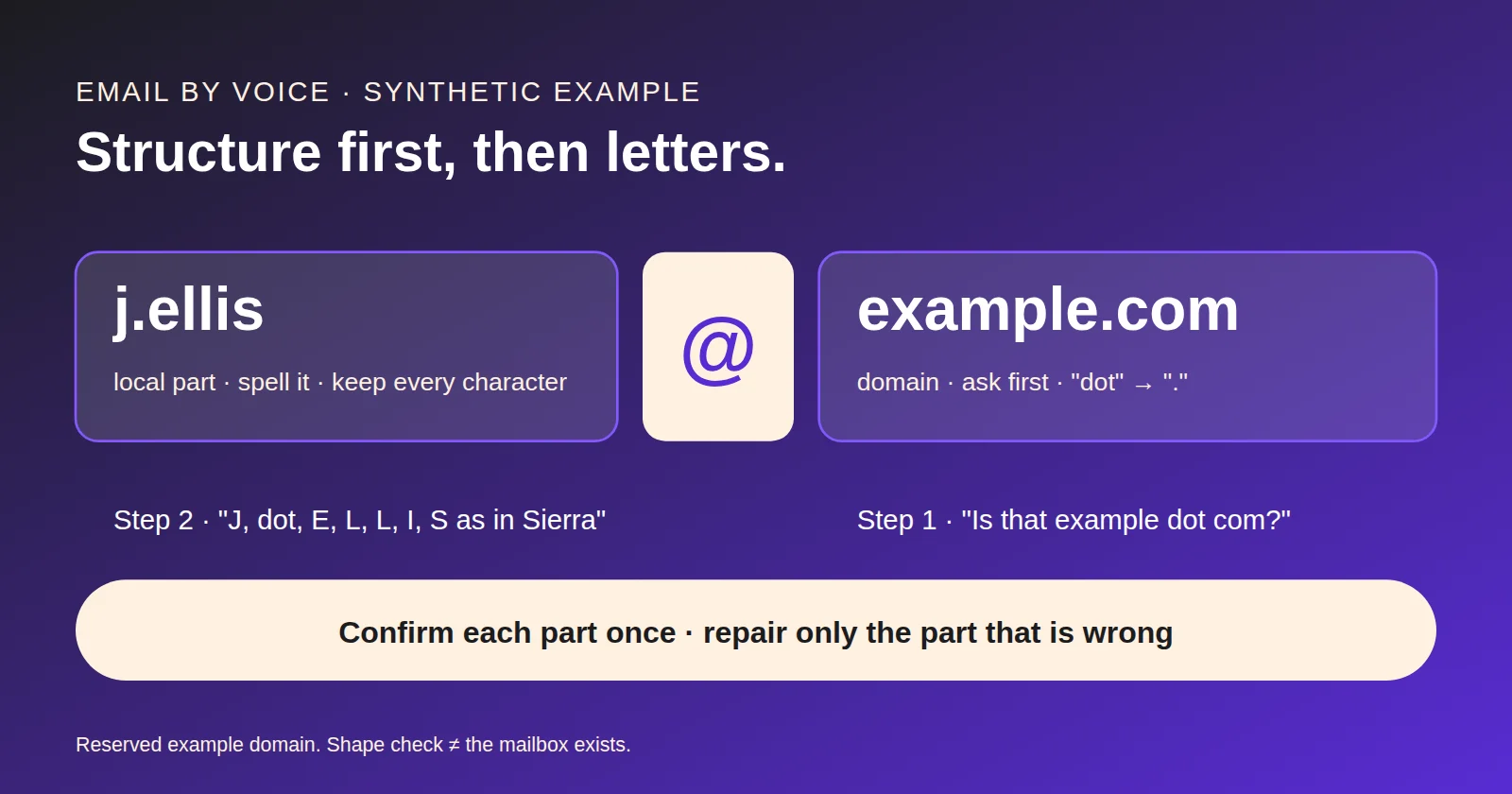
An email address has three parts: the local part (before the @), the @ itself, and the domain (after it). Capture them separately.
- Ask for the domain first when it is likely to be common. "Is that a Gmail address, or another provider?" A common provider removes most of the domain spelling in one turn. If it is a company or personal domain, ask the caller to spell it.
- Then ask for the part before the @, letter by letter. Prompt: "Please spell the part before the at sign, one letter at a time." Encourage a spelling word for uncertain letters: "B as in Bravo".
- Normalise spoken symbols. Map "dot", "period" and "full stop" to ".", "underscore" to "_", "dash" and "hyphen" to "-". Keep a short list of these in the design, so a caller in the UK and a caller in the US are treated the same.
- Keep every character as recognised. Voice carries no letter case, so do not ask callers about capitals. Store the part before the @ exactly as recognised, normally in lower case, and do not alter dots, hyphens, digits or underscores. Mail software must treat that part as case sensitive, but the standard discourages relying on case (RFC 5321, section 2.4), so a case difference rarely matters in practice.
- Validate the shape, not the existence. Check there is exactly one @, a non-empty local part, and a domain with at least one dot. A shape check proves only that the string could be an email address. It does not prove the mailbox exists or belongs to the caller.
When the caller offers the whole address in one breath and recognition confidence is high, you can accept it and go straight to confirmation. Structure-first is the fallback, not a ritual for every caller.
Addresses: US ZIP and UK postcode
Postal codes are the one part of an address with a fixed format, so capture and check them first. A valid postal code also narrows what the street and town should be.
| United States | United Kingdom | |
|---|---|---|
| Code | ZIP Code: five digits; ZIP+4 is five digits, a hyphen and four digits (USPS DMM 602, 1.8) | Postcode: outward code of 2–4 characters, then inward code of 3 characters, e.g. "PO15 5RR" (ONS, postcode structure) |
| Preferred capture mode | Digits: speech or keypad | Letters and digits: speech with spelling words |
| Ask for it | "What's the ZIP code?" | "What's the postcode?" |
| Format check | 5 digits, or 5 + 4 with hyphen | Outward 2–4 characters, space, inward digit + 2 letters |
| Common error | Transposed digits | Letter confusions (M/N, F/S, B/D), and the space misplaced |
| Unit / flat | "Apartment", "Suite", "Unit" | "Flat", house name, building name |
Order of capture for a full address:
- Postal code first. Format-check it. If you have access to a licensed address lookup, use the code to offer candidate streets; otherwise just move on.
- House number, then street name. Ask the caller to spell the street name if recognition is uncertain or the name is not in a lookup.
- Unit, flat or building. Ask explicitly: "Is there an apartment, flat or unit number?" Callers forget it, and it is the part most likely to cause a failed delivery or visit.
- Town or city last. It is often implied by the postal code, so ask only to confirm.
A format check is not an existence check. "ZZ9 9ZZ" has the right shape for a UK postcode and may not exist. A ZIP Code can be valid and still not match the town the caller named: USPS notes that ZIP Codes do not necessarily adhere to city or municipal boundaries (USPS FAQ). Only a lookup against a current address database tells you an address exists, and even that does not tell you the caller lives there.
Do not offer address-lookup features in your public copy unless your platform actually has them and you have checked them.
Confirmation and repair
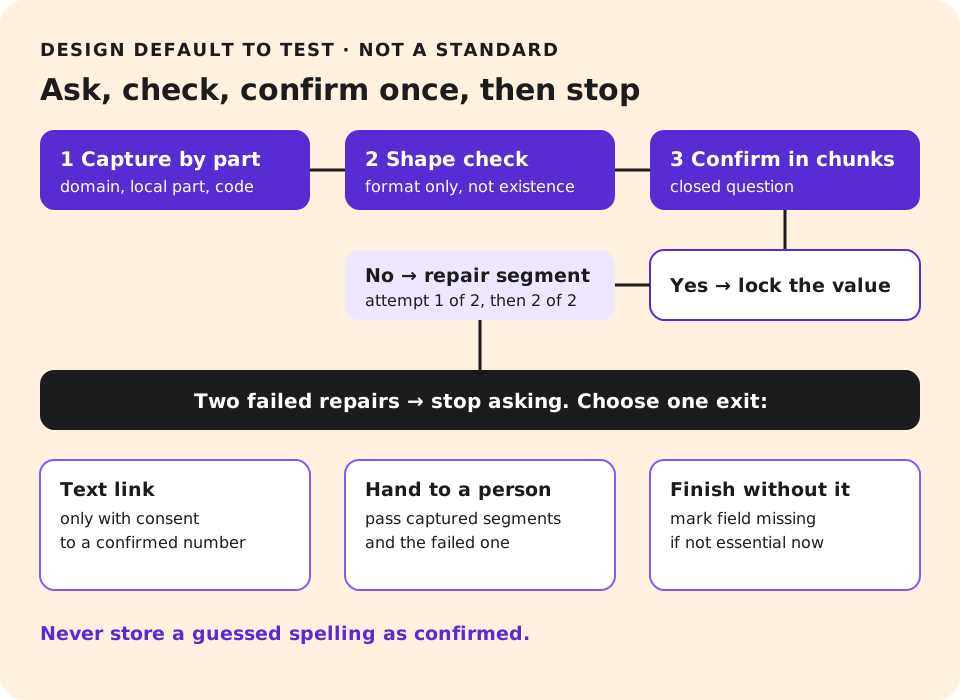
Confirm in chunks a listener can check, and confirm once.
- Email: read the domain, then the local part spelled with spelling words for the letters most often confused. "That's at example dot com. And before that: J, E, L, L, I, S, as in Sierra. Is that right?"
- Address: read number and street, then unit, then postal code. Skip the town if the code implies it.
- Ask a closed question. "Is that right?" and accept "yes", "no" or a correction.
- Repair only the part that is wrong. If the caller says "no, it's E-double-L", replace that segment and re-read only the segment. Do not restart the whole field.
Set an attempt limit and keep it. A reasonable design default is two repair attempts per field. After that, the caller is spending effort on your recognition problem, not on their task. The exact number is a design choice to test, not a standard.
Keep the confirmed value locked. Once a segment is confirmed, a later misrecognition elsewhere must not overwrite it.
When to switch channel or hand over
After the attempt limit, stop. You have three options, and the caller's situation decides which.
Send a text link, only with consent. Ask: "Would it be easier if I texted you a short link so you can type it?" Send it only if the caller says yes and the number you are sending to is one they have confirmed. Record the consent with the call. Messaging rules differ between the US and the UK and by use case; your compliance owner sets them. See AI call disclosure and consent.
Hand over to a person. If the field is essential to finish the task now, such as an address for an urgent visit, transfer to a person with what you have captured and which segment failed. The receiving agent should not start from zero. The AI-to-human handoff guide covers the context payload.
Finish without the field. If the email is only for a follow-up, it may be better to complete the booking with the phone number and mark the email as missing for later. A missing field is better than a wrong one.
Do not keep asking the caller to repeat themselves. Do not guess the most likely spelling and store it as confirmed.
How long to keep recordings and captured personal data is a separate decision; agree it with your privacy team.
A test set you can reuse
Before launch, run a fixed set of spoken inputs through the prototype and record what was captured. The downloadable test set (JSON) has 20 synthetic items on reserved example domains and invented addresses. Each item has the input as a caller might say it, the expected stored value, and the expected behaviour.
| # | Field | Caller says (synthetic) | Expected result |
|---|---|---|---|
| 1 | "jay ellis at example dot com" | Asks to spell local part; does not guess jayellis vs jay.ellis | |
| 2 | "j dot ellis at example dot com" | j.ellis@example.com | |
| 3 | "m n o p underscore 7 at example dot org" | mnop_7@example.org | |
| 4 | "anna hyphen lee at example full stop co full stop uk" | anna-lee@example.co.uk | |
| 5 | "b as in bravo, d as in delta, at example dot com" | bd@example.com | |
| 6 | "my email is the same as last time" | Does not invent; checks record or asks | |
| 7 | After a read-back of jelis@example.com, caller says "no, two Ls" | Repairs segment only: jellis@example.com | |
| 8 | Fails twice | Offers consented text link or continues without | |
| 9 | Caller declines to give email | Continues task; field marked declined | |
| 10 | "at at example dot com" | Shape check fails; asks again | |
| 11 | US address | "ZIP is nine oh two one oh" | 90210 accepted as format-valid |
| 12 | US address | "one two three four five dash six seven eight nine" | 12345-6789 |
| 13 | US address | "one two three four" | Rejected: not five digits |
| 14 | US address | "apartment 4B" asked explicitly | Unit captured |
| 15 | US address | Caller omits unit, says "no unit" | Unit = none, not blank |
| 16 | UK address | "P O fifteen, five R R" | PO15 5RR |
| 17 | UK address | "E C one A, one B B" | EC1A 1BB (format test only) |
| 18 | UK address | "M as in Mike, one, one A A" | M1 1AA (format test only) |
| 19 | UK address | "Flat 2, Rose House" | Flat and building captured |
| 20 | UK address | Postcode heard as "ZZ9 9ZZ" | Format valid; flagged as not checked for existence |
Score each item as captured correctly, captured wrongly, or not captured, and keep the three apart. A wrong value stored as confirmed is the failure that matters most, so report it separately; do not let it disappear into an average.
Run the same set on a phone line, not only in a browser, and add a few callers with different accents from your real caller base. A synthetic set tests the logic; it does not tell you real-world accuracy.
Where NextLevel fits
NextLevel.AI builds voice agents that capture caller details for booking, lead and support flows. Which validation and lookup features apply to your deployment is confirmed per project, not assumed from this article. For qualified prospects, NextLevel typically has a working prototype ready in about 2 weeks and then tunes it to your business (a typical time, not a guarantee), which makes the prototype a practical place to run the test set above on your own callers' phrasing.
Next step: book a scoping call from the pricing page to plan a prototype test of your capture flow.
Frequently asked questions
Should the agent spell back the whole email address?
Not in one go. Read the domain, then the part before the @, with spelling words for confusable letters. Confirm once, and repair only the segment the caller corrects.
Is a format-valid postcode or ZIP Code a real address?
No. A format check proves only the shape. Only a lookup against a current address database shows an address exists, and it still does not show the caller lives there.
When should the agent offer a text link instead?
After the attempt limit, and only if the caller agrees and the number is confirmed. Record the consent. Your compliance owner sets the messaging rules.
Can I lower-case the whole email address?
Voice carries no letter case, so store the part before the @ as recognised, normally in lower case, and leave every other character unchanged. RFC 5321 says mail software must treat that part as case sensitive, but it discourages relying on case.
Sources
- RFC 5321, Simple Mail Transfer Protocol, section 2.4, read 9 Nov 2026.
- USPS Domestic Mail Manual 602, 1.8 ZIP Code and ZIP+4, read 9 Nov 2026.
- USPS FAQ, ZIP Code: The Basics, read 9 Nov 2026.
- ONS, Postal geography: postcode structure, read 9 Nov 2026.
- Related NextLevel guides: voice AI conversation design, AI-to-human handoff, AI call disclosure and consent.