
You have decided an AI agent will start answering your phone next month. The agent will say it is an AI on every call. The open question is whether your customers should hear about the change before they ring, and if so, what you tell them, where and when.
There is no single right answer, and announcing it badly can cause more worry than saying nothing. This guide helps you decide whether to announce the change, gives a short message kit with fill-in lines for your website, voicemail, email and staff, and sets out a timing plan from the week before launch to the end of the first month. NextLevel sells voice agents; this is practical guidance, not legal advice.
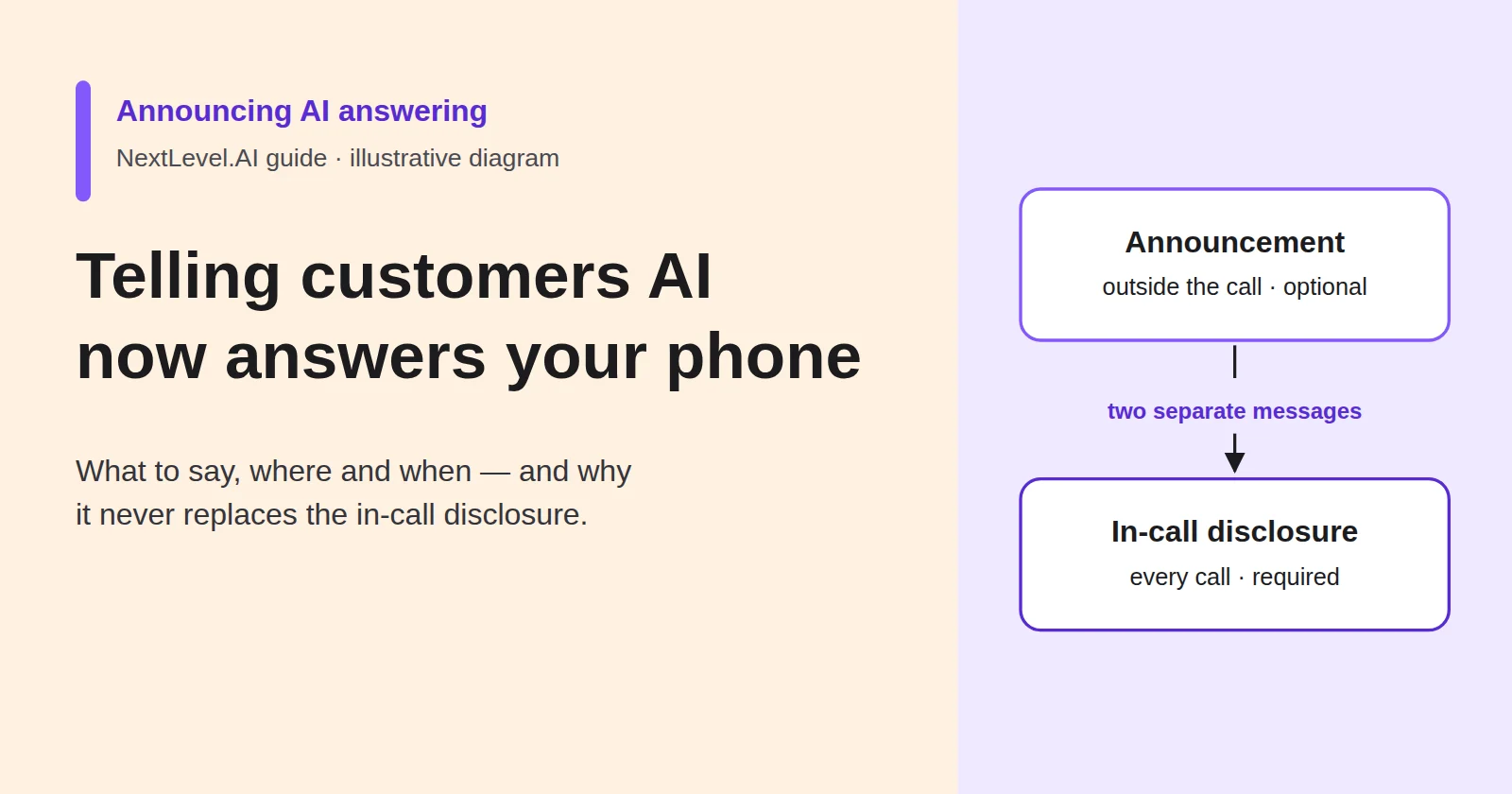
Announcement is not the in-call disclosure (and does not replace it)
Two different messages are involved, and they do different jobs.
The in-call disclosure is what the agent says on the call itself: that the caller is speaking to an AI, and any recording notice your setup needs. It belongs on every call, whatever you announce elsewhere. A website banner does not tell a caller who has never visited your website who they are talking to. The wording belongs to whoever owns compliance in your business; NextLevel's guide to voice AI consent and disclosure covers how to design it, and its phone script templates include example lines for counsel review.
The announcement is what you tell customers outside the call: that the way your phone is answered has changed, what that means for them and how to reach a person. It is optional, and it is a customer-relations decision rather than a compliance step. Its job is to remove surprise, so that a regular customer is not caught off guard by an unfamiliar voice and does not conclude something has gone wrong.
Keep the two apart in your planning. An announcement never shortens or replaces the disclosure, and the disclosure does not make an announcement unnecessary for customers who rely on you.
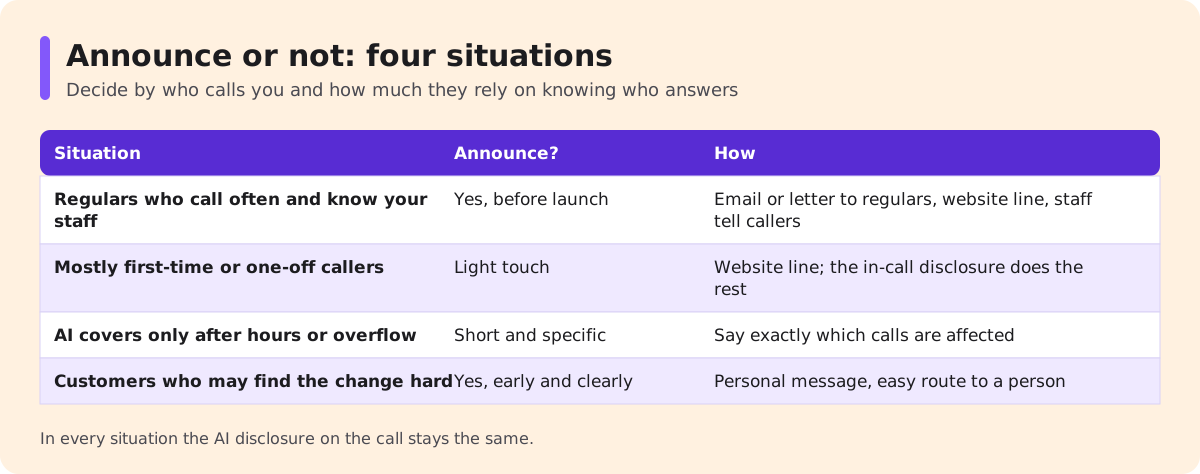
Announce or not: four situations
Whether to announce depends on who calls you and how much they rely on knowing who answers.
| Situation | Announce? | How |
|---|---|---|
| Regulars who call often and know your staff | Yes, before launch | Email or letter to regulars, website line, staff tell callers in person |
| Mostly first-time or one-off callers | Light touch | Website line; the in-call disclosure does the rest. A big announcement would mostly reach existing customers, not the strangers it concerns |
| AI covers only after hours or overflow | Short and specific | "Calls outside our opening hours are now answered by our AI assistant" |
| Customers who may find the change hard, or long personal relationships | Yes, early and clearly | Personal message before it happens, an easy route to a person that works on day one, staff ready to explain |
The after-hours case is the easiest to get wrong by saying too much. Customers who call during opening hours will see no change, so a message that says "AI now answers our phone" worries them for nothing. Say exactly which calls are affected. For regulars, a simple option is for staff to mention it to each regular who calls or visits in the fortnight before launch.
If your callers are a mix, choose by the group that would be most surprised. A first-time caller has no earlier voice to compare with; a regular does. So a business that mostly takes new callers but has a core of regulars can keep the light-touch website line for everyone and add a direct message to the regulars alone. Staff can tell them in person, as above, or send the short email from the message kit below. If the most surprised group is customers who may find the change hard, plan for them first: tell them personally and check that the route to a person works before launch day. The website line then covers everyone else, and the in-call disclosure covers every call.
Where you are unsure, announce. A short, accurate message costs little and avoids the complaint that "nobody told us".
What the message must say: what changes, what does not, how to reach a person
Every version of the announcement, whatever the channel, answers three questions in plain words.
What changes. Which calls the AI answers (all calls, after-hours only, overflow when the team is busy) and from when. Name it as an AI assistant. Do not give it a human name or describe it in a way that suggests a person.
What stays the same. Your number, your opening hours, the people who do the work and anything the customer already has booked. Say so explicitly, so regulars know nothing they rely on is going away.
How to reach a person. The simplest way to speak to someone: ask the assistant to be put through, call during staffed hours, or use a direct contact you name. Only promise a route you actually provide.
Keep it short. Two sentences on the website, under a hundred words in an email. Describe only what the agent does on launch day, in the customer's terms ("book an appointment", "check our hours"), and leave out technical words such as models or training. If bookings come later, announce them later.
Do not promise outcomes you cannot show, such as "you'll never wait again" or "you won't notice the difference". The second is also misleading, because the point of the disclosure is that the caller does notice.
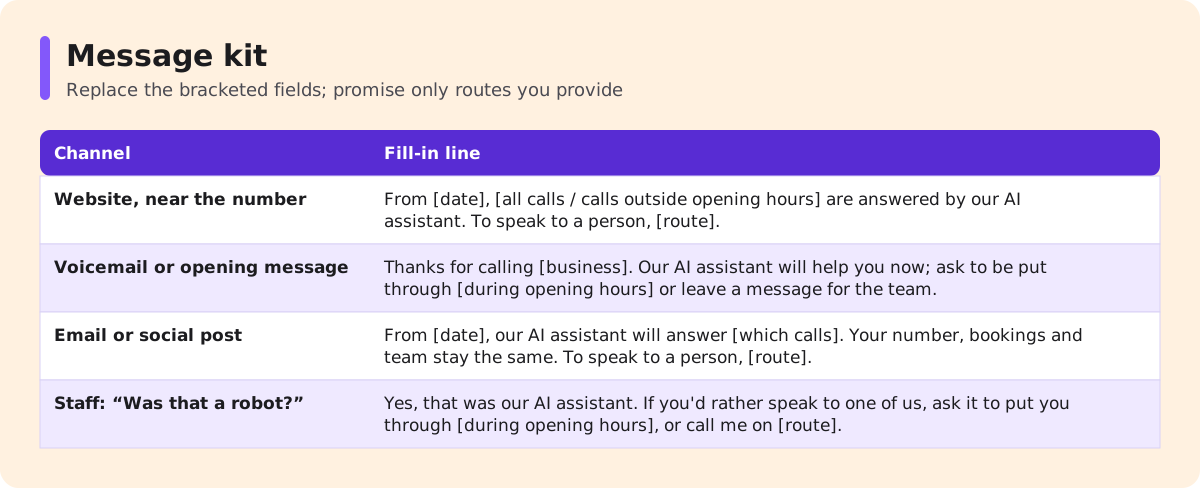
Message kit (replace the bracketed fields):
| Channel | Fill-in line |
|---|---|
| Website, near the phone number | "From [date], [all calls / calls outside opening hours] are answered by our AI assistant. It can [answer questions, take bookings, pass on messages]. To speak to a person, [ask the assistant to transfer you / call between hours]." |
| Voicemail or opening message (if you keep one before the AI answers) | "Thanks for calling [business]. Our AI assistant will help you now; ask to be put through [during opening hours] or leave a message for the team." |
| Email or social post to customers | "From [date], our AI assistant will answer [which calls], so you get an answer [when]. Your number, bookings and team stay the same. To speak to a person, [route]. Questions? Reply to this email." |
| Staff script for "Was that a robot?" | "Yes, that was our AI assistant. It answers [which calls] so calls get answered when we can't pick up. If you'd rather speak to one of us, you can ask it to put you through [during opening hours], or call me directly on [route]." |
The staff line matters most. NextLevel's script templates give the agent the same honesty on the call: asked whether it is a real person, it says it is the business's AI assistant and offers to keep helping or connect the caller with someone on the team. Staff should say the same off the call.
Where it goes and when
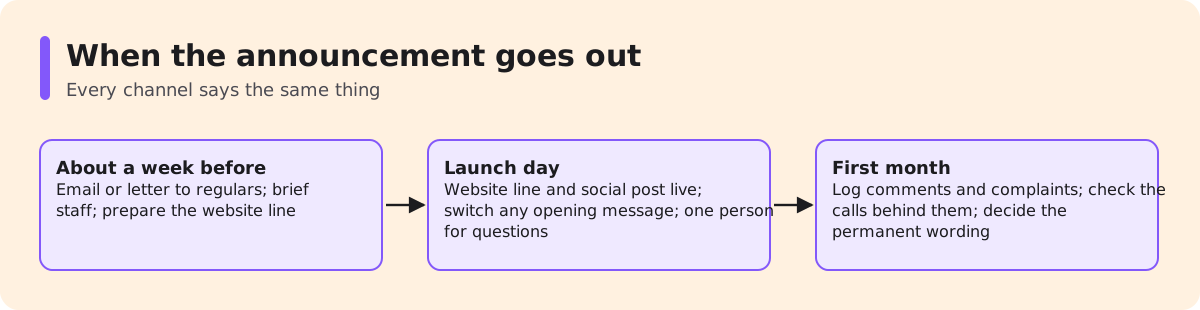
Plan the announcement in three stages around the launch date.
Before launch (about a week ahead). Send the email or letter to regular customers and brief your staff with the "Was that a robot?" line. Update the website text near your phone number so it is ready to go live. List every other place your number appears with an explanation of how to call you: the contact page, booking confirmations, invoices, email signatures and, for businesses with a counter, a printed sign. If a support team answers your line, put the same three answers in a help-centre notice and any recorded message before the AI answers, and give agents a saved reply for "was that a bot?".
Launch day. Publish the website line and any social post. If you keep a recorded opening message before the AI answers, switch it at the same time. Have one person available to take calls from customers who want to talk about the change.
First month. Keep the website line up. Note every comment or complaint about the change and look at the calls behind them: a complaint about "the robot" is sometimes a complaint about a wrong answer. After a month, decide whether the website line can become permanent wording on your contact page.
Keep every channel saying the same thing. If the email says after-hours only and the website says all calls, customers will believe whichever is wrong. That includes your Google Business Profile: Google's help page says it may call to confirm details such as opening hours, and adds the answers to the profile, marked "Pending" while reviewed (documented for the US). The hours your agent gives must match.
Answering complaints about the change
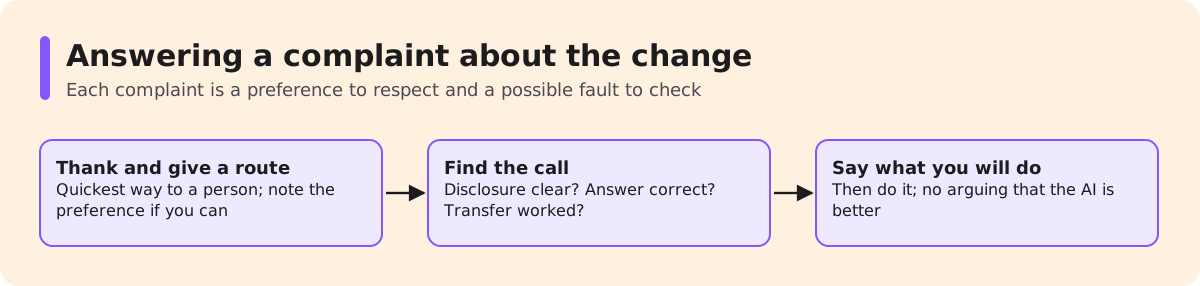
Some customers will not like it. Treat each complaint as two things: a preference to respect and a possible fault to check.
Respect the preference first. Thank the customer, give them the quickest way to reach a person and, if you can, note on their record that they prefer to speak to someone. Whether your setup can route a known number straight to a person is a question to confirm when scoping; if it cannot, give the customer a direct contact.
Then check the fault. Find the call the customer is talking about. Was the disclosure clear? Did the agent answer correctly? Did the transfer work? A customer who says they "couldn't get through to anyone" may have found a real gap in your transfer rules.
Do not argue that the AI is better, and do not promise to switch it off unless you mean to. Say what you will do, such as passing their call to a person in future, and do it.
FAQ
Do I have to announce the change?
The in-call AI disclosure belongs on every call regardless. An announcement outside the call is your choice; this guide is not legal advice.
Should the AI have a human name?
No. Call it your AI assistant so nobody is misled.
How long before launch should I tell customers?
A simple option is about a week: long enough to notice, short enough to remember.
What if a customer refuses to use it?
Give them a direct route to a person and note their preference.
Should the announcement mention call recording?
It can, but the in-call notice is what tells each caller. The announcement does not replace it.
Will customers mind?
Some will. Clear expectations and a working route to a person matter more than the announcement itself.
Next step
Before you write the announcement, hear what your customers will hear. Book a 30-minute call with the NextLevel team from the pricing page: qualified prospects can get a working prototype of their agent, typically in about 2 weeks and set up with NextLevel's help, to test the disclosure and transfer route before launch. NextLevel then tunes it to their business. The 2-week time is typical, not a guarantee. For what the receptionist does, see the AI answering service page.