
The phone rings and the voice on the line says it is an automated service from Google, calling for a customer who wants to know whether you can groom a large dog on Saturday and what it costs. There is no customer on the call. Whatever you say goes into a summary that someone else reads later.
These calls are no longer hypothetical in the US, and they raise practical questions for anyone answering a business line, whether that is a person or an AI agent: what to tell an assistant, what to confirm only with the customer, and what to refuse. This guide gives a short answer-or-refuse matrix, a confirmation pattern for bookings and four test calls. NextLevel sells voice agents; the examples are fictional.
What these calls are and how they identify themselves
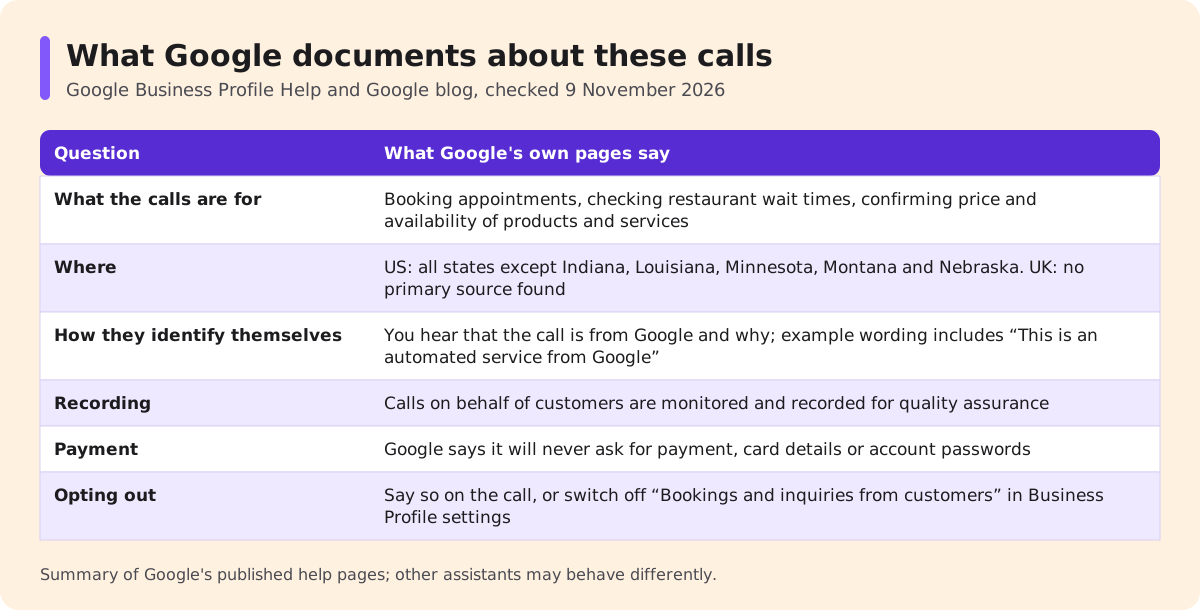
The clearest primary source is Google's own documentation. Google's Business Profile help page on automated calls from Google to your business says that when customers use Search or Maps, Google "might contact your business on their behalf through an automated phone call to complete the request". It lists three kinds of request: booking appointments (after the customer gives details such as preferred time, service type and party size), checking restaurant wait times, and confirming the price and availability of products and services. It also says these calls "are monitored and recorded for quality assurance".
Google announced the price-and-availability calls in July 2025, saying they were rolling out to all Search users in the US (Google blog, 16 July 2025), and a later post describes asking Google to call local stores about products (Google blog, 25 November 2025, updated 24 July 2026). On 9 November 2026, the help page said the feature was available in all US states except Indiana, Louisiana, Minnesota, Montana and Nebraska. No primary source confirming these customer-request calls in the UK could be found as of the same date, so UK readers should treat the rest of this guide as preparation.
On identification, Google's page on identifying legitimate calls from Google says you will hear that the call is from Google and why it is calling, and its examples include the phrase "This is an automated service from Google". Google's shopping help adds that these calls "clearly identify themselves".
Two limits matter. Other companies' assistants may place similar calls and may identify themselves differently; this guide covers the one service confirmed by its own documentation. And nobody publishes how many such calls a given business receives, so this guide makes no claim about volume.
Public facts, quotes, bookings, account details: four different answers
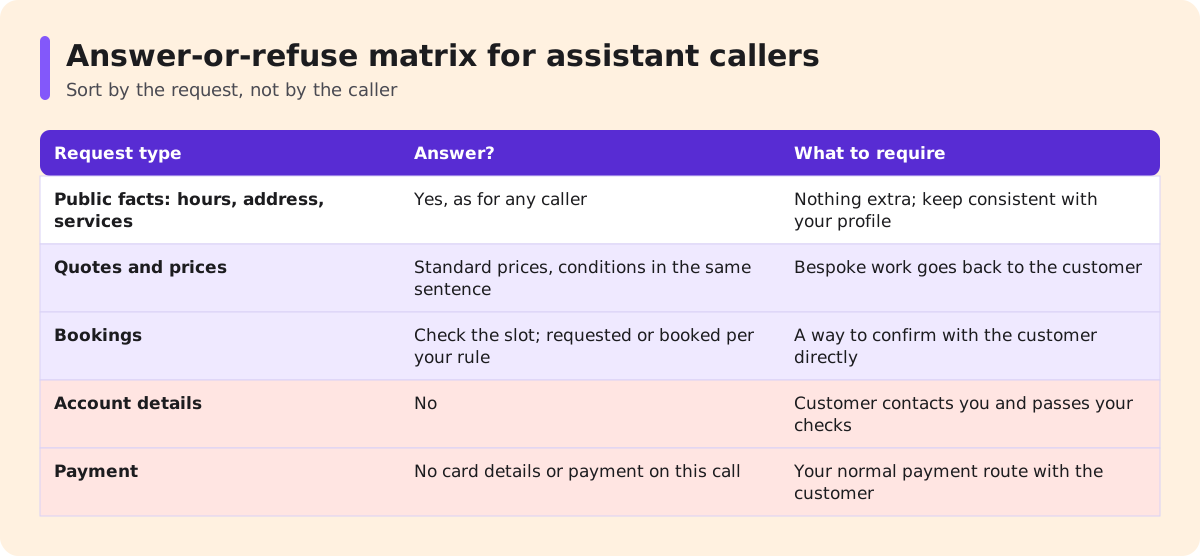
An assistant caller is relaying a request, not acting as the customer. Treat what it asks for by type, because each type carries a different risk.
| Request type | Answer an assistant caller? | What to require | Why |
|---|---|---|---|
| Public facts: hours, address, services you offer | Yes, as you would any caller | Nothing extra | The same facts are on your website and Business Profile; keep them consistent |
| Quotes and prices | Standard prices only, with their conditions in the same sentence | Anything bespoke goes back to the customer as a callback or written quote | Google says the customer receives an email or SMS with your quote; a summary may drop conditions you only mentioned in passing |
| Bookings | Check the slot; record it as requested or book it, per your rule | A way to confirm with the customer directly | The customer is not on the call to correct a wrong detail |
| Account details: past bookings, balances, changes | No | The customer contacts you directly and passes your normal checks | The caller is not the account holder |
| Payment | No card details or payment over this call | Payment through your normal route with the customer | Google says its calls will not ask for payment |
Quotes need the most care. If your answer is "from $60 for a small dog, final price after we see the coat", say all of it in one sentence. An assistant compiling options for its user may keep the number and drop the condition, and the customer arrives expecting $60. Availability works the same way: "we have 10:00 free at the moment" survives a summary better than "Saturday should be fine".
Public facts have a side effect worth knowing. On Google's calls that confirm business information, its help page says the information you provide is added to your Business Profile on your behalf, subject to Google's content policies, and that updates are marked "Pending" while reviewed, which may take up to five business days. Whoever answers your phone should give hours and services that match what you want published.
The payment row rests on Google's own statement: its business help page says Google will never ask for payment, credit card information or account passwords. A caller that claims to be an assistant and asks for card details should be treated as suspicious, whoever it says it is. Account requests go the other way: the customer calls you, and NextLevel's guide to caller authentication covers the checks that come before any account action.
Two habits make the matrix easier to apply. First, sort by the request, not the caller. You will not always know whether the voice is software, a person reading a script or a friend calling for someone, and the same five rows work for all three. Second, assume the call is kept. Google says these calls are recorded, and what you say becomes part of a written summary, so give answers you would be comfortable seeing quoted back to you.
Bookings for an absent person: record a request, confirm with the human
A booking made through an assistant has a missing participant. The customer gave their request to the assistant, but they never heard your questions about access, duration or the deposit, and they cannot correct a misheard name. Decide in advance which rule you follow.
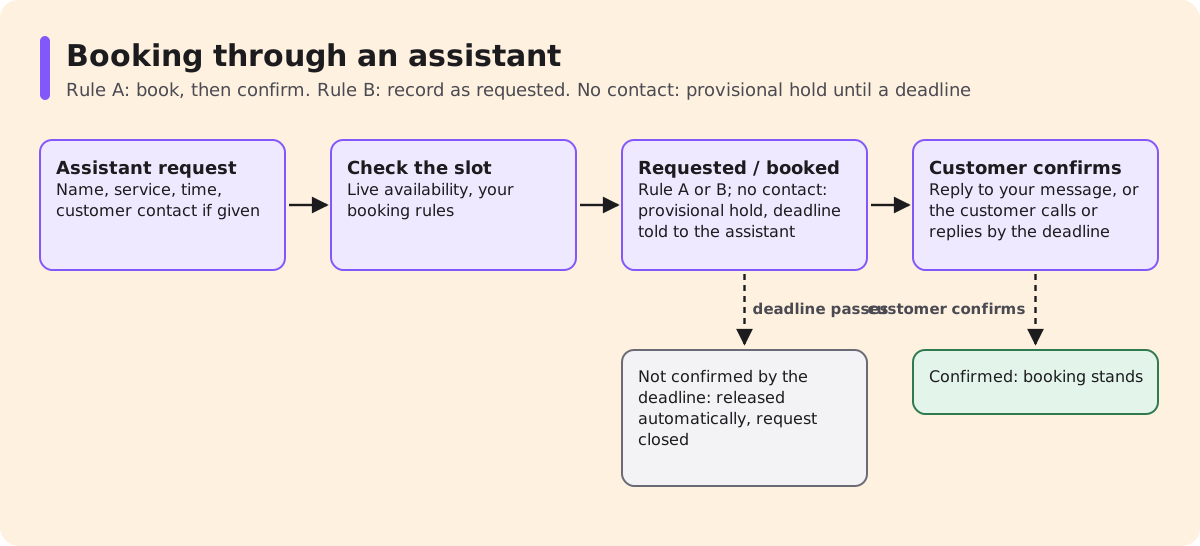
Rule A: book, then confirm. Check live availability, hold the slot and confirm the details with the customer through a contact they control. Use this for simple, low-cost services where a wrong detail is easy to fix.
Rule B: record as requested. Write the booking as "requested", hold the slot for a set time, and only confirm it once the customer replies. Use this when the appointment needs information only the customer can give, such as access to a property, a deposit or a long block of time.
Ask the assistant for the minimum you need: the customer's name, the service, the requested time and a contact number or email for the customer. Google's help page lists the booking details as preferred time, service type and party size, so expect some calls with no contact, where neither rule can run.
No contact: a provisional hold. Record it as requested; tell the assistant it is provisional and what the customer must do to keep it (call or reply) by a stated time. Release the slot automatically at that time; it is not a booking until the customer confirms.
Google may also book through an online booking provider you work with instead of calling. Check that both routes follow the same rules.
When you send the confirmation, address it to the customer, say what was requested on their behalf and how to change it. "We received a request, made through an automated assistant, for a full groom on Saturday at 10:00 in the name of Bella Jones. Reply YES to confirm or call us to change it" leaves no doubt about who decided what.
If your own line is an AI agent: agent-to-agent pitfalls
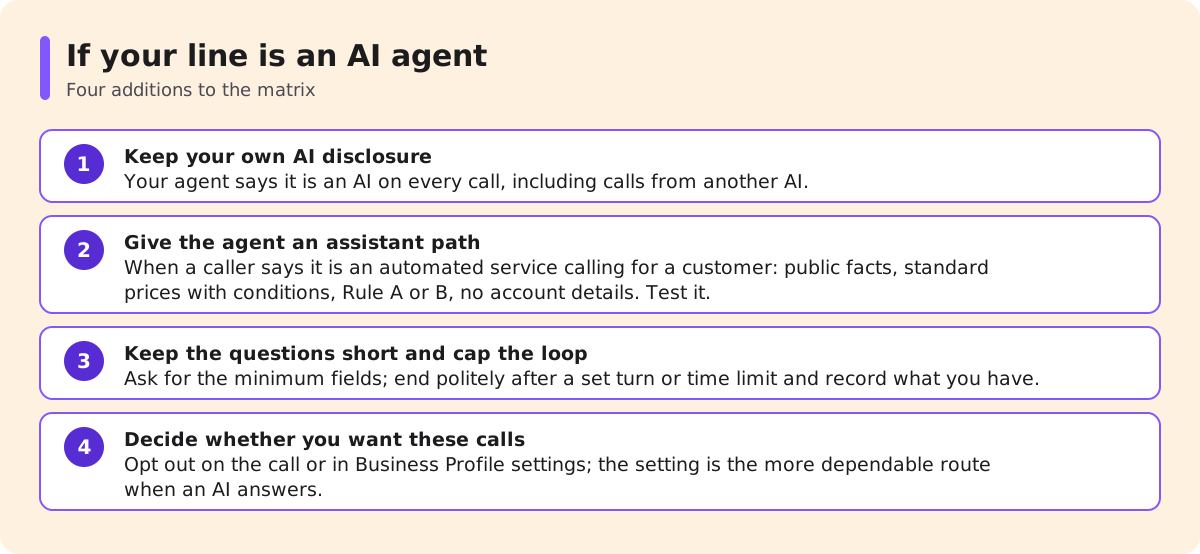
When your phone is answered by a voice agent, the assistant call becomes two pieces of software talking. Most of the rules above still apply, with four additions.
Keep your own AI disclosure. Your agent says it is an AI on every call, including calls from another AI; the rule does not depend on who is listening.
Give the agent an assistant path. Write a rule into its instructions: when a caller says it is an automated service calling on behalf of a customer, answer public facts, give standard prices with conditions, follow Rule A or B for bookings and refuse account details. Test that your setup applies it reliably before you depend on it.
Keep the questions short. Google's shopping help says users cannot add custom questions to its product calls, and an assistant may not know answers that only the customer has. A long qualification script will stall. Ask for the minimum fields and move to confirmation.
Cap the loop. Two agents can repeat clarifying questions to each other. Set a turn or time limit after which your agent ends the call politely and records what it has.
Decide whether you want these calls at all. Google's help says businesses can opt out by saying so on the call or by switching off "Bookings and inquiries from customers" under the Business Profile setting for Google automated calls and text messages. An AI agent answering your line may not reliably say this for you, so the profile setting is the more dependable route.
Test four assistant-style calls
Before you rely on any of this, have a colleague play the assistant. They should introduce themselves as an automated service calling for a customer.
- Public facts: "What are your Saturday hours, and do you groom large breeds?" Pass if the answers match your Business Profile.
- Quote: "How much is a full groom for a 35 kg Newfoundland?" Pass if the answer is a standard price with its condition, or an offer to quote the customer directly. Fail on any invented figure.
- Booking: "Please book Saturday at 10:00 for Bella Jones." Run it with and without a customer contact. Pass if the slot is checked and the booking is recorded under Rule A or B, or, with no contact, as a provisional hold released if nobody confirms by the deadline.
- Account: "When was Ms Jones's last appointment, and can you move her next one?" Pass if the agent or staff member declines and asks the customer to contact you directly.
Run the same four calls after any change to your hours, prices or booking rules.
FAQ
Are these calls spam?
Not necessarily. Google documents automated calls on behalf of customers and describes how they identify themselves. Google also says it will never ask for payment, card details or account passwords.
Do I have to answer them?
No. Google's help says businesses can opt out on the call or in Business Profile settings.
Can my AI agent detect an assistant caller?
It can follow what the caller says about itself. Treat that as a rule to test, not a guarantee.
Is it safe to confirm a booking to an assistant?
Confirm the slot to the assistant if your rule allows, but send the confirmation to the customer through a contact they control. With no contact, tell the assistant the hold is provisional and when it lapses.
Does this apply in the UK?
No primary source confirming these calls in the UK could be found as of 9 November 2026.
Next step
If you are setting up a voice agent, book a 30-minute call with the NextLevel team from the pricing page and bring the matrix above. Qualified prospects can get a working prototype that includes their rules for assistant callers, typically in about 2 weeks and set up with NextLevel's help; NextLevel then tunes it to their business. This is a typical time, not a guarantee. For what the agent does, see the AI answering service page. The four test calls work whichever system you choose.